

Watch Folders
Permute can be set to watch a folder for input using macOS feature called Folder Actions which allow you to run custom actions on files added to a folder.
Here is a specific example on how to set up such action to convert added files (we’re assuming image files in this example) to HEIF:
1) Make sure that the HEIF preset is set up in a way that you want in Settings > Presets.
2) Open the Shortcuts app and create a shortcut that:
- it is set to be a Quick Action
- the input for the Quick Action is Files
- add Permute’s “Convert Media Files” action
- fill the preset name
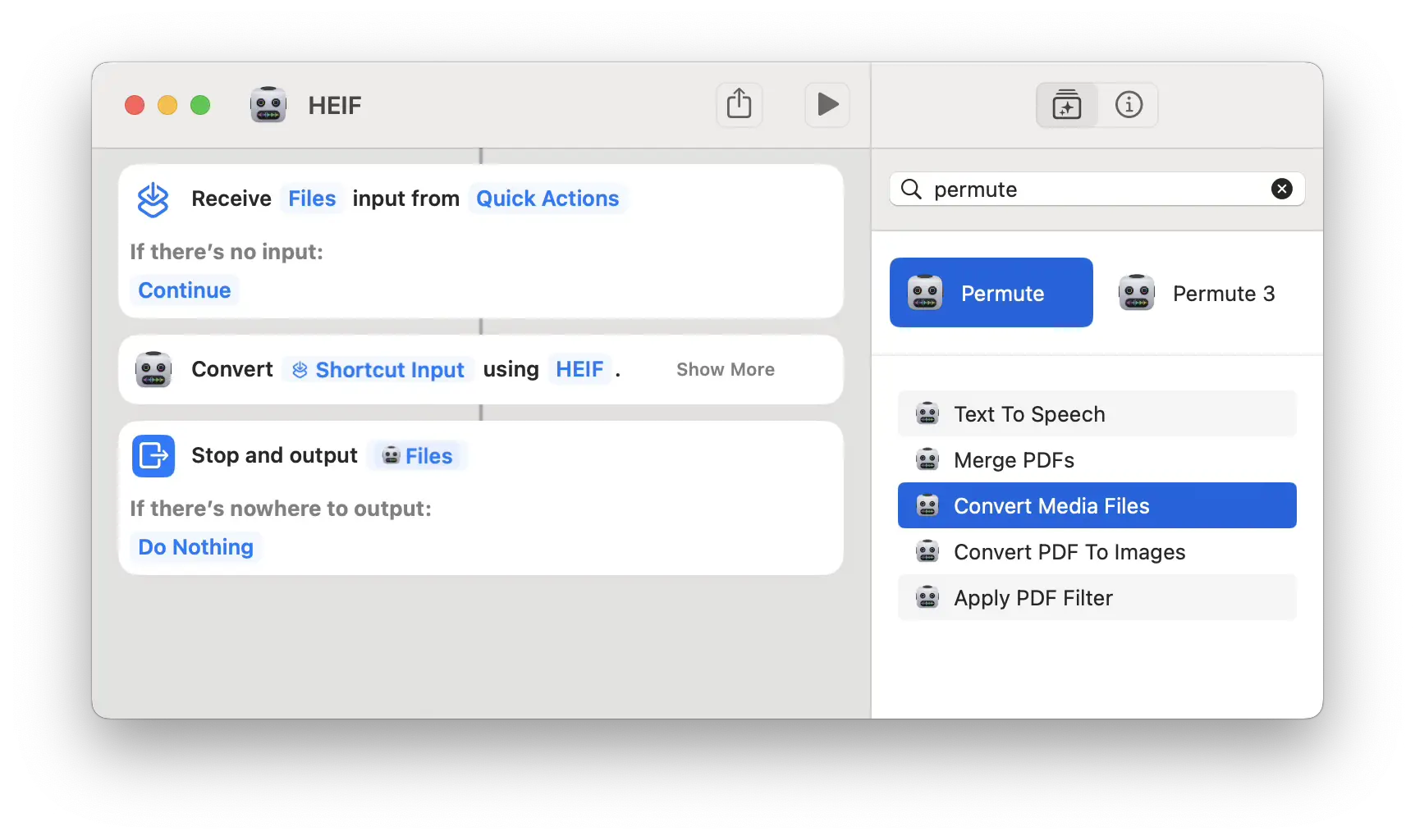
3) Open the Automator app: - create a folder action - add Run AppleScript phase and use the following code (change ‘My Shortcut Name’ to the actual name of the shortcut created in step 2):
on run {input, parameters}
    repeat with i from 1 to (count input)
        set filePath to (POSIX path of (item i of input))
        set scriptText to "shortcuts run 'My Shortcut Name' -i '" & filePath & "'"
        do shell script scriptText
    end repeat
    return input
end run
That’s it!