
YouTube
This help article contains several sections:
- Non-MP4 downloads or long postprocessing.
- Switching between languages.
- Information about a YouTube Warning.
<a name="format"></a>**Files are being downloaded as WebM or AV1 (MKV) or the conversion after the download is taking really long.
YouTube's content above 1080p is only available in WebM or AV1 video formats. These downloads are then placed in files with .webm and .mkv extensions that do not play in QuickTime Player and require a 3rd party player (VLC, Elmedia Player, ...). The .webm file may have an icon of your browser (Chrome, Firefox, ...) as these browsers can handle these formats.
If you want the downloaded file to be an MP4 file, there are several solutions:
- if you want the full resolution, set postprocessing to MP4, though please note that re-encoding video at 4K resolution can take considerable amount of time. See the postprocessing help article for more information.
- go to Settings > General and limit the quality to 1080p. Most videos on YouTube offer a 1080p rendition in MP4 and Downie will select it. In combination with the postprocessing set to MP4 (see above), you will always end up with an MP4 file and as the resolution is lower, the conversion will take less time than in case of 4K video.
- go to Settings > General and enable the "Force MP4 Format" option which will force Downie to select an MP4 rendition even though it's not the highest resolution available. Example: a video is offered at 4K in WebM, 1080p in WebM and 720p in MP4 - Downie will select the 720p download in MP4.
<a name="language"></a>**Videos with Audio in Different Languages
Certain videos are provided with multiple audio tracks in different languages. There are two possibilities, how to force Downie to download the track that you want:
Option #1 - Manual Selection
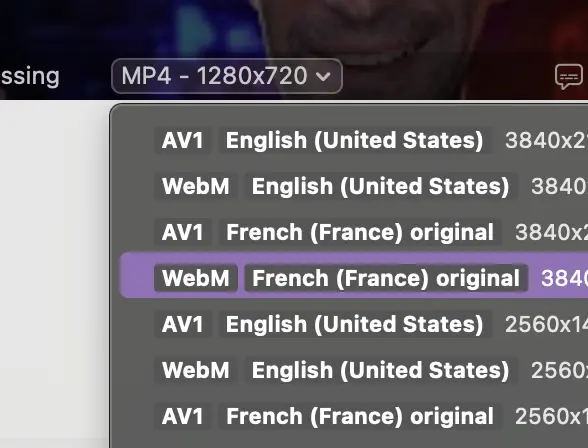
You can manually select which rendition Downie should download. By default, Downie will list all combinations of formats and languages from which you can choose. This likely requires some settings modifications which is described in a different help article - see the relevant help article for more information..
Option #2 - Automatic Selection
Add the audio track name to Settings > Subtitles & Audio under automatically selected audio tracks.
Please note that the name must match exactly as is extracted by Downie, which you can find out following Option #1 above. In the example shown in the screenshot below, you need to add either "French (France) original" or "English (United States)". Adding just "French" or "English" will not be a complete match. Please see the quality selection help article for information on how to get the menu on the download.
PLEASE NOTE: As this is a common point of confusion - the title must match what Downie displays. It usually matches what YouTube displays, but doesn't have to - this example can be displayed as "Français (France) original" in YouTube UI - i.e. localized. That will, however, not work properly with Downie. If you add the label that YouTube is displaying and Downie is still downloading the incorrect audio, you have added the label incorrectly.
<a name="warning"></a>**YouTube Warning
You have likely received a warning about the future uncertainty of YouTube downloads. Please note that this is not just about Downie, but most tools that download YouTube content, this is not just related to this app, but a generic warning about the direction YouTube is taking.
Over the year 2024, YouTube has made several major changes to their content distribution. This section of this help article tries to explain the challenges that had to be overcome.
For a long time, YouTube has been signing the content links (you can call them download links, but they are really just links that lead to the actual content) using an always-changing JavaScript in order to protect them. These links have historically been included in the source code of the webpage. This has partially changed during 2024 with YouTube more and more relying on an API using so-called clients which are their 'apps' - like web, iOS, Android, Android TV, etc.
Downie has always been mimicking these API calls and is currently doing so as well. <del>The issue recently has been that many of the clients started requiring so-called PO Token (proof of origin) which is a secure anti-bot token. You can read more about this by googling for "po token youtube", there's a lot of information about this, including how to manually obtain it. The important thing here is the word manually. I am still exploring various possibilities as more and more of these clients nowadays require a PO Token to be included and I understand that it's not a real possibility for a user to dig around developer tools in their browser trying to obtain it and copy-paste it into Downie every few hours.</del> Edit: Starting Downie 4.9.1, Downie generates the PO Tokens automatically.
But there's another thing that's even "scarier" in a way - if you inspect a playing video in either Safari or Chrome, you find out that YouTube is no longer using regular GET requests or even regular formats. They load each segment of the video via a POST request which contains a request body whose precise structure is known pretty much just to YouTube and these segments are returned in a response with Content-Type: application/vnd.yt-ump header which denotes the content type of the data returned by the server. And this is their proprietary format which can introduce custom encryption, etc.
Should you panic? No. For the time being, everything should be working. But as with everything - it's a 3rd party online service that can change at any point in time. All the API calls that Downie makes are not to public API endpoints meaning that YouTube is in no way obliged to keep them the way they are now or keep them at all. They can make any change to their site at any time. IMHO it is clear that YouTube is moving towards a really custom and secure video delivery system. They cannot do this at a snap of a finger with a platform this large, but they can do it gradually over the next few years or even months.